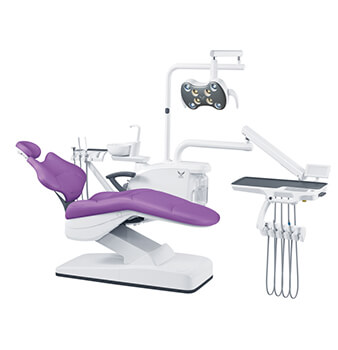
Orthodontic practices are no longer built around one treatment pattern. Fixed appliances remain central, while clear aligners, intraoral scanning, digital treatment planning, and hybrid orthodontic workflows are changing how patients move through the operatory. Align Technology reported 691.8 thousand clear aligner case shipments in Q2 2026, up 7.4% year over year, reflecting continued activity in aligner-based treatment.
For a clinic owner, distributor, or project buyer, this affects equipment selection in a very practical way. The right dental unit has to work with the clinic’s treatment mix, staffing pattern, room layout, and instrument setup. It is not simply a matter of buying the unit with the longest feature list.
Gladent manufactures several dental unit configurations, including integral, hydraulic, floor-fixed, implant, disinfection, and mobile trailer-type models.
Before comparing models, start with the appointments that will actually take place in the room. Orthodontic treatment can move from a longer bonding procedure to a short adjustment, then to an aligner review or digital scan. These visits place different demands on patient positioning, instrument delivery, suction, lighting, and operator access. Mapping that workflow first helps buyers separate genuinely useful features from options that may add cost without improving daily work.
Fixed-appliance treatment can require bonding instruments, handpieces, curing equipment, suction, and frequent changes in viewing angle. Clear aligner visits may involve fewer chairside instruments, but intraoral scanning and digital records introduce another piece of equipment into the operatory.
Hybrid treatment is also becoming more visible. A 2026 North American orthodontist survey found that half of respondents used treatment plans combining fixed appliances and clear aligners.
For the dental unit buyer, the point is not whether one treatment type is better. The question is whether the orthodontic operatory has enough working space for the dentist, assistant, instrument tray, suction, and any scanner cart without creating unnecessary crossing or repositioning.
A dedicated orthodontic treatment unit may suit a high-volume room where procedures are highly standardized. A configurable integral dental unit can make more sense when the operatory also handles examinations or other dental procedures.
The purchasing decision should therefore be based on procedure mix, instrument requirements, staff positions, and available space. A product category alone does not tell a buyer whether the final configuration will work well in the clinic.
Once the clinical workflow is clear, equipment specifications become easier to judge. In orthodontics, small differences in headrest movement, backrest shape, delivery position, and assistant access can affect dozens of appointments in a working week. This section focuses on specifications that have a direct operational effect rather than features that simply look good in a catalog.
The clinician needs reliable access to the upper and lower arches without repeatedly moving away from the patient. Headrest adjustment and the space around the backrest therefore deserve a hands-on check before purchase.
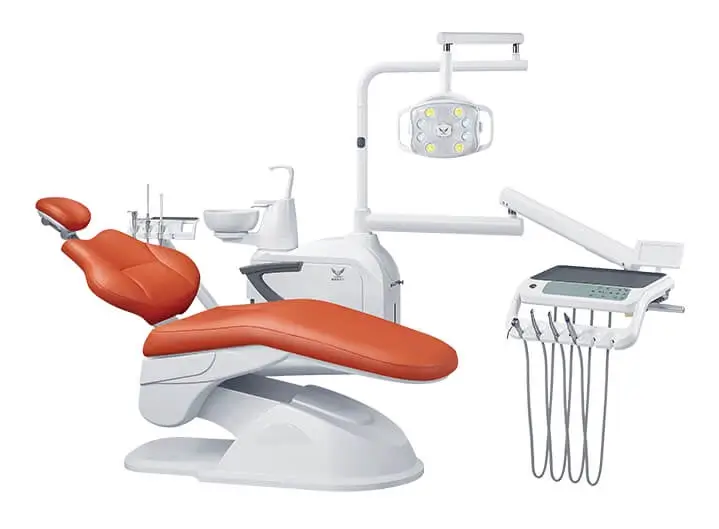
The GD-S200 Plus Integral Dental Unit uses a multi-joint movable headrest that allows forward and backward angle adjustment. Its single-armrest layout and rotating unit box also affect how patients enter the chair and how much working space is available around the unit.
For an orthodontic clinic, those features are most useful when they are tested against real operator positions. A short simulated bonding or adjustment procedure often reveals more than a static showroom demonstration.
Instrument delivery should match the clinic’s normal appointment rather than an occasional procedure. A bonding visit may require more tray space and chairside instruments than a routine aligner review. The assistant should also be able to reach suction without crossing into the dentist’s main working zone.
Lighting deserves the same attention. The oral light needs enough movement to follow changes in chair and head position while keeping the treatment area clear.
When comparing a dental chair unit, ask the supplier to confirm the actual handpiece connections, suction configuration, delivery layout, and optional instrument requirements before the quotation is finalized. That is more useful than assuming two units with similar-looking trays will support the same workflow.
A dental unit never works in isolation. Cabinets, stools, doors, scanner carts, storage, imaging equipment, and utilities all compete for room around it. This becomes especially important in orthodontic practices using compact rooms or open-bay layouts. The equipment may fit the drawing on paper but still create an awkward treatment area once every moving component and staff position is included.
A private operatory often benefits from keeping the main treatment functions together in one station. An integral unit combines the patient chair with instrument delivery, suction, operating light, and other chairside controls, reducing the need for several separate fixed modules.
Buyers comparing this type of setup can review Gladent’s Integral Dental Unit range and then narrow the selection according to room size, delivery preference, instrument connections, and assistant workflow.
The final installation drawing still matters. Check the working position of the tray, light, cuspidor, stools, and any mobile digital equipment—not only the footprint of the chair base.
An open-bay orthodontic clinic needs a different space check because several treatment stations can share circulation routes and equipment.
Mark the full operating envelope of every dental unit. Include the doctor tray when extended, the light in treatment position, assistant access, stools, and the parking position of an intraoral scanner or mobile cart. Patient entry should remain clear even when neighboring stations are occupied.
Once the room layout is settled, the next question is how consistently the unit supports repeated chairside movements throughout the day. In a high-volume orthodontic setting, preset positions and close operator access can become more useful when similar appointments repeat across many patients.
Orthodontic clinics often have many short, recurring appointments. That makes repeatability more important than it may appear during the buying stage. A chair position that can be recalled quickly, a backrest that allows close access, or a tray that stays within the operator’s working zone can remove small interruptions. None of these features replaces good clinical workflow, but they can support it when the configuration matches the team.
For buyers who need repeatable chair positioning, the GD-S300 Integral Dental Unit provides three memory positions. It also uses a thin, narrow butterfly-style metal backrest designed to allow closer access around the patient.
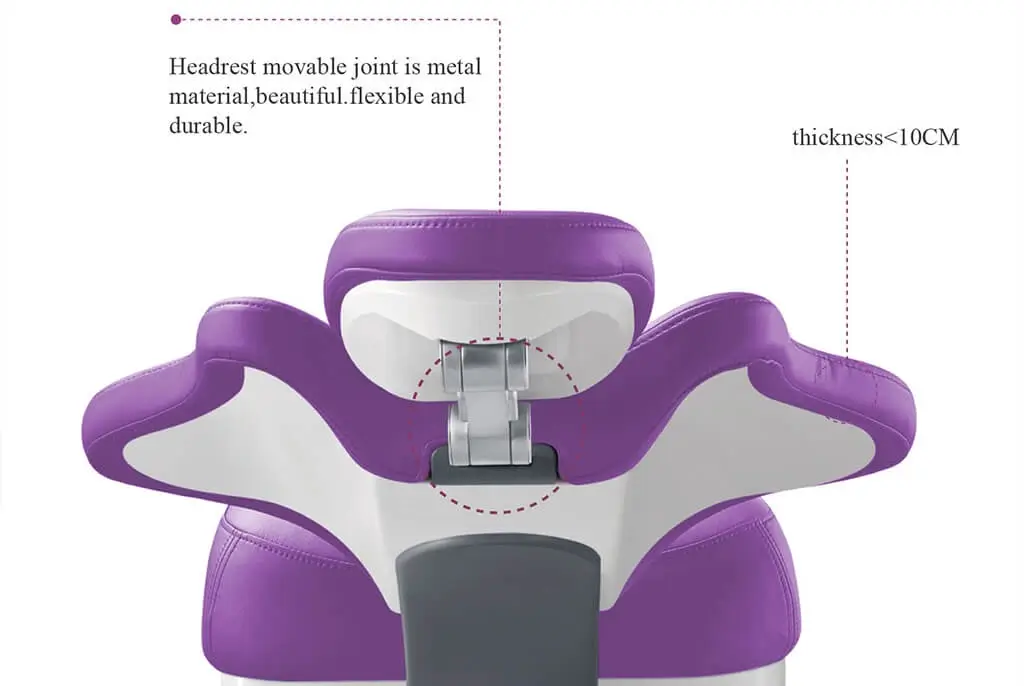
The purchasing question is not simply whether a unit has memory presets. Buyers should test whether those positions correspond to the clinic’s common procedures and whether staff can move between appointments without unnecessary chair, tray, or stool adjustments.
That distinction is important for distributors as well. Features that make sense in one clinic may not justify standardizing the same configuration across every customer project.
By the time a buyer requests a quotation, the clinical and room requirements should already be reasonably clear. A vague request such as “quote 20 dental units” leaves too many decisions unresolved and makes supplier comparison difficult. A stronger RFQ gives the manufacturer enough detail to discuss a suitable configuration and gives the buyer a cleaner basis for comparing price, included equipment, and installation requirements.
For an orthodontic dental unit project, include:
Distributors placing repeat orders should also record the approved model, voltage, instrument connections, optional accessories, and other configuration details on the final quotation or configuration sheet. That makes future orders easier to reproduce and reduces ambiguity when spare parts or accessories are requested.
Choosing a dental unit for an orthodontic clinic in 2026 is mainly a matter of matching equipment to workflow. Fixed appliances, clear aligners, digital orthodontics, intraoral scanning, high-volume appointments, and open-bay layouts all affect how the treatment area is used.
Start with patient positioning and operator access. Then check instrument delivery, suction, lighting, chair controls, room clearance, utilities, and repeat-order requirements. The best specification is the one that fits the clinic’s procedures without adding unnecessary complexity.
For a project quotation, send Gladent the treatment mix, room layout, required instruments, destination market, and quantity through the Gladent contact page.
A: An orthodontic dental unit is configured around orthodontic workflows such as bonding, adjustments, aligner reviews, patient positioning, and repeated chairside access. A general-purpose dental unit may also work well when its configuration matches those requirements.
A: Yes. An integral dental unit can suit orthodontic treatment when the chair positioning, headrest, instrument delivery, suction, lighting, and room layout fit the clinic’s workflow.
A: Important points include patient positioning, headrest adjustment, operator access, instrument delivery, suction, operating light movement, chair controls, and space around the unit for staff and digital equipment.
A: Use the selected model’s installation dimensions together with the working space required for the tray, light, stools, assistant position, patient entry, cabinets, and scanner equipment. The chair footprint alone is not enough for room planning.
A: Include the treatment mix, room quantity and layout, preferred delivery configuration, required instruments and suction, utility requirements, destination country, order quantity, and installation schedule. This gives the dental unit manufacturer enough information to prepare a more accurate configuration and quotation.
 No. 1, No. 2, Fenggang Industrial Zone, Lianhe, Luocun, Shishan Town, Nanhai District, Foshan City, China
 Call us now:+86-757-81267151